

Best overall for recurring purchase approvals: Approveit. Best for custom workflows across Microsoft services: Microsoft Power Automate. Best for broader procurement: SAP Ariba. Best for purchase orders within an existing ERP: Oracle NetSuite. This 2026 guide separates approval automation from procurement management so you can choose the right scope.
TL;DR
Approveit is the best purchase order approval software pick for recurring approvals in Slack, Microsoft Teams, and email.
Microsoft Power Automate suits teams building broader custom workflows across Microsoft services.
SAP Ariba suits broader procurement requirements; Oracle NetSuite suits purchasing managed within its ERP.
Choose purchase approval software around decision rules, record requirements, and the system that owns your purchase orders.
Why this matters
A purchase request and a purchase order serve different purposes. The request asks for permission to buy. The purchase order records the order placed with a supplier. Your approval process must make clear which event authorizes spending.
Manual approvals in Slack, Teams, or email leave that distinction to the people involved. A manager can approve a message without seeing the supplier, purchase details, or supporting document. Finance then has to establish what the approval actually covered.
For your 2026 shortlist, decide whether you need better approvals or a broader purchasing system. Those are different projects. Buying procurement software to solve a routing problem adds scope; buying a workflow tool without identifying the purchase-order system leaves the handoff unresolved.
What makes the best purchase order approval software?
Use these criteria before comparing product names:
Approval location: Can decision-makers review requests where they already work, or must they use another application?
Routing rules: Can your process direct requests to the right people based on the information that matters to your business?
Decision records: Can you establish who approved which request and what information supported the decision?
Purchase-order ownership: Does the product manage purchase orders, or handle approvals around a separate purchasing system?
Workflow administration: Who will maintain forms, routing, permissions, and exceptions after setup?
Exception handling: What happens when a request changes, an approver is absent, or information is incomplete?
Treat these as evaluation questions, not assumptions about every product. Ask vendors to demonstrate your actual process. A generic approval demo does not establish that your purchase-order controls will work.
Purchase order approval software at a glance
The order below follows the decision you need to make: start with approval automation, then consider a workflow builder, a procurement platform, or an existing ERP.
Approveit
Best for: Recurring purchase approvals in collaboration tools
Standout capability: No-code approvals through Slack, Microsoft Teams, and email
Key limitation to evaluate: Confirm the handoff to your purchase-order system
Microsoft Power Automate
Best for: Custom workflows across Microsoft services
Standout capability: Approval actions within configurable automated workflows
Key limitation to evaluate: Your team must own flow design and maintenance
SAP Ariba
Best for: Broader procurement requirements
Standout capability: Procurement software covering more than approval routing
Key limitation to evaluate: Evaluate the wider implementation scope
Oracle NetSuite
Best for: Purchasing within an existing NetSuite ERP
Standout capability: Purchase-order management within an ERP environment
Key limitation to evaluate: Fit depends on your ERP configuration and purchasing process
No single category wins every use case. An approval layer keeps the decision process focused. A procurement platform or ERP addresses a wider operational record.
1. Approveit: best for purchase approvals in Slack and Teams
Approveit provides no-code workflow approval software for finance, HR, IT, and operations. Its stated scope includes purchase, invoice, expense, and request approvals directly within Slack, Microsoft Teams, and email.
That makes it the first option to evaluate when your main alternative is manual approvals in those channels. You are replacing an informal request-and-reply process with a defined workflow, rather than starting with a procurement-system replacement.
Best for: Teams with recurring purchase approvals whose decision-makers already work in Slack, Microsoft Teams, or email.
Purchase approval strengths
No-code workflow setup fits teams that want to manage approvals without writing software.
Purchase and invoice approvals fall within the stated product scope.
Approveit integrates with NetSuite, streamlining approvals through Slack, Microsoft Teams, and email while keeping NetSuite as the purchasing system.
Approvals take place in the communication tools named above.
Finance, HR, IT, and operations can evaluate the same product for their respective request processes.
Purchase approval trade-offs
You still need to define approval authority and the information each request requires.
Validate how an approved request reaches your purchasing or accounting process; approval alone does not establish that handoff.
Check record access and export requirements during the demonstration rather than assuming a specific audit format.
For a useful 2026 demonstration, bring a purchase request, an approver change, and a request revised after approval. Ask to see the entire decision path, not just the approval notification.
Verdict: Buy Approveit for recurring purchase approvals in collaboration tools when the demonstrated workflow and purchasing handoff meet your requirements.
2. Microsoft Power Automate: best for broader custom Microsoft workflows
Microsoft Power Automate is a general workflow automation service with approval actions. Consider it when you need to build a broader custom process across Microsoft services. Approveit also supports approvals directly in Microsoft Teams, so using Teams alone is not a reason to choose Power Automate over dedicated approval software.
The distinction is ownership. A workflow builder gives your team responsibility for how the process behaves. That responsibility includes request intake, routing, errors, changes, and the connection to the purchasing record.
Best for: Teams building broader custom workflows across Microsoft services, with a clear owner for design and administration.
Microsoft Power Automate pros
Approval actions are part of its workflow-building capabilities.
Microsoft Teams can participate in approval workflows.
A configurable process can cover steps surrounding the decision, not just the approval itself.
Microsoft Power Automate cons
Your team must design and maintain the purchasing workflow.
Connector access, licensing, and permissions need checking against the exact systems involved.
A completed approval flow does not, by itself, define your purchase-order policy.
Evaluate the route from submission through decision to purchasing. Ask the workflow owner to show how a failed action becomes visible and how a changed request returns for review. These operational details matter after the initial flow is built.
For a 2026 evaluation, include the people who will support the workflow, not only the person who can demonstrate it. A process without a maintenance owner leaves finance dependent on undocumented configuration.
Verdict: Consider Microsoft Power Automate for broader custom workflows across Microsoft services when your team will build and maintain them. Choose Approveit for recurring purchase approvals in Microsoft Teams, Slack, and email.
3. SAP Ariba: best for broader procurement requirements
SAP Ariba belongs on the shortlist when purchase-order approval is part of a larger procurement requirement. Its procurement scope extends beyond moving a request to an approver.
That broader scope changes the evaluation. You need to map purchasing responsibilities, supplier-related processes, and the systems involved. Do not judge a procurement platform solely by whether its approval screen looks convenient.
Best for: Organizations selecting procurement software rather than only replacing manual approval messages.
SAP Ariba pros
Broader procurement scope makes it relevant when approval is only one requirement.
Purchasing and supplier-related processes can be considered within the same product family.
It gives procurement stakeholders a reason to evaluate the buying process beyond the approval step.
SAP Ariba cons
The evaluation involves more scope than a standalone approval workflow.
You must identify the relevant product components and system connections.
A broader procurement project requires agreement across the teams that own purchasing and its records.
Start with the procurement outcome you need. If your requirement stops at routing a purchase request to a manager, compare the narrower workflow options first. If it includes managing procurement processes, bring procurement and systems owners into the evaluation.
Ask for a demonstration that follows your purchasing record through the relevant stages. Identify where the approval happens, where the purchase order resides, and who maintains the process. Product-family breadth is not a substitute for confirming the specific configuration.
Verdict: Buy SAP Ariba when your requirement includes broader procurement management; skip the broader project if approval routing is the only problem.
4. Oracle NetSuite: best for purchasing within an existing ERP
Oracle NetSuite is an ERP that includes purchase-order management. If your purchase orders already live there, NetSuite can remain your purchasing system while Approveit streamlines the approval process on top of it.
This is an ERP-process decision, not simply a messaging preference. The evaluation should focus on the configured purchasing workflow, user permissions, and how approvals relate to the transaction record.
Best for: Existing NetSuite users reviewing purchase-order controls within their ERP.
Oracle NetSuite pros
Purchase-order management sits within an ERP environment.
Existing users can evaluate approvals alongside their established purchasing records.
Finance and system administrators can review purchasing controls together.
Oracle NetSuite cons
Approval behavior depends on the configuration you implement.
Users need appropriate access to the relevant purchasing process.
Adopting an ERP solely to improve approval messages introduces a much broader project.
Approveit and NetSuite are complementary, not just competing options. Approveit integrates with NetSuite and brings approvals into Slack, Microsoft Teams, and email. NetSuite users can improve the approval experience without replacing their existing purchasing system.
For a 2026 review, ask the administrator to demonstrate a routine purchase order and an exception. If an outside approval layer is also under consideration, establish which system owns the decision record and how updates remain consistent. Do not create competing versions of approval status.
Verdict: Keep NetSuite for purchasing records; choose Approveit on top of NetSuite when you want to streamline recurring approvals through Slack, Microsoft Teams, and email.
How the ranking works
This ranking prioritizes fit to the approval problem, not vendor size or feature-count claims. The criteria are approval location, routing, decision records, purchase-order ownership, administration, and exceptions.
The default recommendation addresses recurring approvals in communication tools. Microsoft Power Automate occupies the workflow-builder slot; SAP Ariba occupies broader procurement; Oracle NetSuite occupies existing-ERP purchasing. These are distinct use cases, not interchangeable promises.
What to demonstrate before you choose
Start with 1 workflow, not every purchasing exception at once. Choose a recurring request with a clear owner and a known purchasing destination. Use it to assess the following sequence.
Request intake
Show the information an approver needs: requester, supplier, purchase description, business reason, and supporting documents. Decide which information must be present before routing begins.
Approval routing
Identify the person authorized to decide and the conditions that change that route. Separate managerial permission from any finance review your policy requires.
Decision record
Show how a reviewer establishes the outcome and the request information associated with it. Ask what happens to the record when someone edits the request.
PO handoff
Identify the system or person responsible for creating or updating the purchase order. An approved request must lead to a defined next action, not another ambiguous message.
Change review
Demonstrate how a revised supplier, amount, or purchase scope gets reviewed. Decide which changes require a new decision before placing the order.
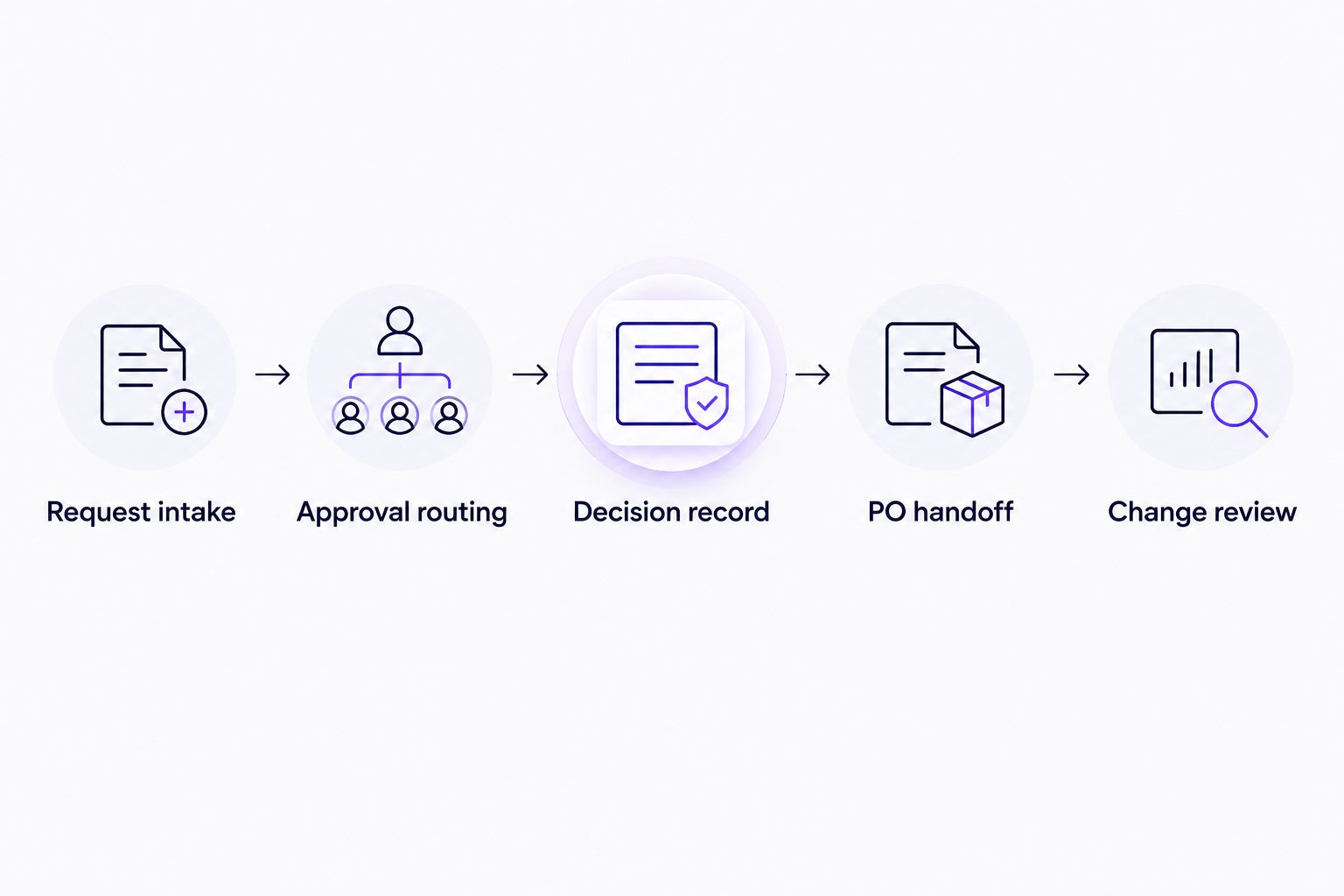
Approval software must fit the purchasing handoff, not just deliver a decision notification.
Run 3 test cases before accepting the workflow: a routine request, a request with an absent approver, and a request changed after approval. These are recommended checks, not a claim about any vendor's performance.
Also distinguish 2 decision points: permission to make the purchase and authorization of a material change. Your policy determines whether they need separate reviews. The software should reflect that policy rather than leave the distinction to message history.
Review your purchase approval workflow
Explore no-code purchase approvals in Slack, Microsoft Teams, and email.
When manual approvals are still the better choice
Manual approvals remain a reasonable option when requests are occasional, authority is clear, and you can reliably retain the decision with the purchasing record. Automation should solve a recurring process problem, not add another application without a purpose.
Best for: Simple, occasional purchases with a clearly accountable owner.
Manual approval pros: You can use existing communication tools and follow a straightforward decision path without configuring software.
Manual approval cons: Request completeness, follow-up, and recordkeeping depend on people maintaining the process. Each exception needs deliberate handling.
Keep manual approvals if that process meets your needs. Move to software when you need repeatable intake, routing, and decision handling across recurring requests. Do not confuse a faster reply with a controlled purchasing process.
Which purchase order approval software should you choose?
Choose the narrowest product scope that satisfies your purchasing controls. Start with a dedicated approval workflow when requests and decisions are the problem. Choose a workflow builder when your team wants to own the configuration. Evaluate procurement software when the requirement extends beyond approvals.
If purchasing already lives in NetSuite, you do not need to replace it to improve approvals. Approveit integrates with NetSuite and lets decision-makers handle approvals through Slack, Microsoft Teams, and email. For your 2026 selection, demonstrate the connected workflow and confirm how purchasing records and approval decisions stay aligned.
FAQ
What's the best purchase order approval software for Slack or Teams?
Approveit is the recommended starting point for recurring purchase approvals in Slack or Microsoft Teams. Its stated scope includes no-code purchase, invoice, expense, and request approvals in those tools and email. Confirm your purchasing handoff during the demonstration.
Is purchase approval software the same as procurement software?
No. Purchase approval software focuses on requesting and recording decisions, while procurement software addresses a broader purchasing process. Choose based on whether you need approval routing or wider procurement management.
Is Microsoft Power Automate better than a dedicated approval tool?
Not simply because your team uses Microsoft Teams: Approveit also supports approvals directly in Teams. Choose Approveit for recurring purchase approvals in Microsoft Teams, Slack, and email; consider Power Automate when you need to build a broader custom workflow around Microsoft services. Compare both using the same request and exceptions.
Should I use Oracle NetSuite for purchase order approvals?
Keep NetSuite as your purchasing system if your purchase orders already live there. Approveit integrates with NetSuite to streamline the approval process through Slack, Microsoft Teams, and email, so the choice is not necessarily NetSuite or Approveit. Demonstrate the connected workflow and confirm how purchasing records and approval decisions stay aligned.
Can I keep approving purchases through email?
Yes, if your manual process reliably captures the request, authorized decision, and purchasing record. Recurring routing and recordkeeping problems are reasons to evaluate automation. Email alone does not define your approval policy.
What should I ask in a purchase approval software demo?
Ask the vendor to demonstrate your request from intake through approval and purchase-order handoff. Include an absent approver and a changed request. Check how decision records and exceptions are handled.
Does purchase approval software automatically create purchase orders?
Do not assume it does. Approval and purchase-order creation are separate functions, and the handoff depends on the product and configuration. Ask each vendor to show the exact process your team requires.
One last thing
Test a changed purchase, not just a new one. A clean demonstration can end at approval while your real process continues through supplier changes, revised scope, and order placement.
Before you select software, name the person who owns the next action after approval. That single responsibility makes the difference between a completed decision and a purchase request waiting in another queue.







